

A Sales Automation Guide: What Teams Should (and Shouldn’t) Automate
Sales automation can save your sales team several hours each day spent updating CRM records, following up with prospects, and building outreach lists manually. According to Salesforce research, sales representatives spend up to 60% of their workweek on non-selling activities such as administrative work, internal meetings, and manual tasks.
However, all sales automation is effective when used to simplify correct tasks. Many companies implement sales automation in CRM and only realise several months later that their replies decreased or some prospect got the same message from three different reps. It is annoying if a sales rep sends you one duplicate email. However, getting an offer from three people can make a buyer wonder about how organised your sales process is. Usually, such mistakes happen due to the fact that the reps use automation for actions that still require human intervention or due to implementing automation in a CRM that hasn’t been updated for a year. Knowing which tasks should be automated and which are better done manually is the difference between productive sales processes and those that cause additional effort.
Why Do Sales Teams Use Sales Automation?
Sales automation eliminates administrative tasks in the daily sales process, allowing salespeople to focus on communicating with prospects and clients. Before automating anything, it can be useful to ask the following question: does the task have one rule that always applies to it, or does it depend on something that the salesperson can identify only in real time, such as intonation, uncertainty, or some off-hand comment regarding the budget? Tasks that follow rules are best suited to be automated by software; reading people is not.
Which Sales Tasks Should You Automate First?
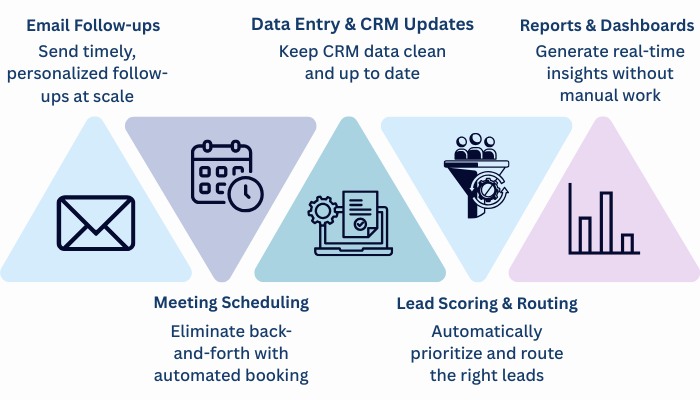
For most sales teams, these are the first tasks worth automating. Most modern sales automation platforms include these capabilities, although setup varies by platform, whether you’re running Salesforce, HubSpot, or another CRM:
-
- CRM updates and deal-stage logging. Automating call logs and pipeline updates removes an end-of-day chore and keeps CRM workflows accurate without relying on anyone’s memory. For most teams, this is where CRM automation starts.
- Lead routing. Shared inboxes are where good leads go to die. Route new leads automatically by territory, industry, or deal size.
- Follow-up scheduling. After a call, the next touchpoint gets queued automatically, so a deal doesn’t go cold just because a rep got pulled into something else that afternoon.
- Meeting scheduling. Reps shouldn’t need fifteen back-and-forth emails to find a slot that works for both sides. Calendar and meeting scheduling tools like When2meet, WhenAvailable, and Doodle are commonly used to simplify the process by letting people compare their availability and settle on a suitable time.
- Top-of-funnel email sequences. Many early-stage nurture emails, sent to opted-in contacts before a prospect has replied or shown any real interest, don’t need to be written from scratch.
- Lead scoring. Incoming leads get ranked by fit and engagement, using signals like job title, company size, or website activity. It’s basic lead management: reps start the day with a shortlist instead of a random queue.
- Contact and company data enrichment. Filling in missing titles, emails, or firmographics on existing records is repetitive data maintenance that doesn’t need a person doing it by hand.
- Prospect list building. Filtering company records by industry, company size, technology stack, or location is a sorting job. Automation cuts that from hours to minutes.
- Pipeline reporting. Weekly forecast summaries and deal-stage reports can generate automatically from CRM data instead of eating a sales manager’s Friday afternoon.
- Data cleansing and deduplication. Most teams automate outbound email long before they automate this, which is backwards. A messy CRM just means the same mistakes reach more people, faster.
- Renewal and contract-expiry reminders. A task to check in on a renewal 60 days out shouldn’t depend on someone remembering the date. The reminder still appears, even when the account owner is on holiday.
Also Read: BizProspex vs ZoomInfo
Which Sales Tasks Should Stay Manual?
Automate these and you’ll likely lose more pipeline than you save. These are the moments where judgement matters more than speed.
- Discovery conversations. A rep asking a genuine follow-up question, based on what a prospect just said, builds trust a scripted sequence cannot fake.
- Objection handling. A pricing objection from a procurement manager usually has more behind it than the words being spoken: a budget cycle, an internal approval chain, a competing vendor already in the room. Uncovering that takes a live conversation, not a decision tree.
- Negotiation. Reading urgency and leverage on both sides of a pricing conversation still depends largely on human experience.
- Key account relationships. Renewal calls and executive check-ins draw on history no database can replicate.
- Final qualification calls. Confirming genuine fit takes a conversation. A lead score alone won’t tell you that.
- Custom proposal terms. Some proposal content can be generated automatically, but pricing, commercial terms, and final scope still need a person. Tools like DealHub can keep the surrounding quoting and approval steps structured, so reps can spend their judgment on the terms that actually need it, rather than chasing versions or waiting on internal sign-off.
- Churn-risk conversations. A client going quiet needs a person figuring out why, not an automated check-in email.
A sales manager who automates proposal negotiation usually creates extra work for themselves down the line. A sales manager who automates CRM updates usually gives every rep an extra hour back each week. The difference isn’t the software. It’s choosing the right work to automate. That choice is getting easier, too: an AI-native CRM now handles record updates, contact enrichment, and interaction logging by default, so reps are left with only the judgement calls.
Also Read: BizProspex vs Cognism
Here’s a simple way to see it side by side:
Sales Automation Checklist
Automate Keep Manual CRM updates and deal logging Discovery conversations Lead routing Objection handling Follow-up scheduling Negotiation Meeting scheduling Key account relationships Top-of-funnel email sequences Final qualification calls Lead scoring Custom proposal terms Data enrichment Churn-risk conversations Prospect list building – Pipeline reporting – Data cleansing and deduplication – Renewal reminders – Choosing the right tasks is only part of the equation. Once the mechanics are automated, the next question becomes what should actually trigger those automated sales workflows.
Also Read: BizProspex vs Lusha
Why Does Data Quality Matter for Sales Automation?
None of this works if the data underneath it is wrong. A sequence built on outdated contact records emails people who no longer work there. A routing rule built on incomplete firmographic data sends accounts to the wrong rep. Good CRM data quality is what decides whether automated workflows help or create more work. Teams often notice the problem only after automation has been running for a while, when duplicate outreach or inconsistent records start showing up in a prospect’s inbox. Before automating anything, verify the contact and company records already sitting in the CRM.
The same logic applies to what triggers automation in the first place. Modern B2B sales automation works best when it’s triggered by real business events rather than a static contact list: a company closing a funding round, a sudden spike in job postings, or a jump in buying intent. That’s when automated outreach reaches prospects while the opportunity is still relevant. This becomes particularly important when several marketing channels work together. Marketing attribution tools can help connect campaign activity with conversions and give teams a clearer picture of which channels and touchpoints are actually influencing revenue.
Also Read: BizProspex vs Hunter.io 2026
The Bottom Line
A simple rule works well: if a task follows the same steps every time, automate it. If success depends on reading another person, keep it in human hands, and make sure the data feeding those workflows is accurate before you scale any of it up.